# Parenting system in an ECS
> Entity parenting in Nuake engine.
A great advantage of using an entity component system, is that when you need to update all of your entities position, you can just iterate over the transform components directly without busting your cache. This creates in itself one disadvantage when separate your components from your entity. When you need to have a scan tree with a hierarchy, you need to be able to find a way to somehow link your entities together without ruining the performance of your neatly packed components in your memory.
If you wish to know more about ECS architectures and how it compares to other architectures, I recommend watching Bob Nystrom's talk on the subject from RogueLike Celebration 2018.
## Just add another component
By adding a component, we can simply keep our existing architecture and keep the ability to iterate of components by themselves. In the case where we need to iterate over the scene hierarchy, we iterate over the newly created *ParentComponent*.
We can think of the ParentComponent like this:
```cpp
struct ParentComponent
{
uint32_t ParentID;
Entity Parent;
bool HasParent = false;
std::vector Children = std::vector();
}
```
> Entity is simply an object that has the numeric handle of the entity in this case.
We can then assume that every entity has that component from now on, you could even include those in your `TagComponent` or `NameComponent`.
## Parenting logic
When we want to add a child to an entity, we simply add the entity to the list of children and update it's `ParentID` to the new parent like so:
```cpp
void SetParent(Entity e, Entity parent)
{
// TODO: Check if entity contains itself
// TODO: Check if entities are not the same
ParentComponent& parentComponent = e.GetComponent();
ParentComponent& parentParentComponent = parent.GetComponent();
parentParentComponent.Childrend.push_back(e);
parentComponent.Parent = parent;
}
```
> This is a simplified function that sets the parent. We would need to do additional checks, like making that the two entities are not the same.
One problem is that, the user might try to parent an entity that already contains itself further down the tree.
```
- Entity1 <-----------*
- Child1 |
- Child2 |
- SubChild1 <--*
- Child3
- Child4
```
For example, the user is trying to drag `Entity1` on `SubChild1`. This would create a cyclic parenting problem.
You can check if an entity already contains itself like so:
```cpp
bool EntityContainsItself(Entity source, Entity target)
{
ParentComponent& targeParentComponent = target.GetComponent();
if (!targeParentComponent.HasParent)
{
return false;
}
Entity currentParent = target.GetComponent().Parent;
while (currentParent != source)
{
if (currentParent.GetComponent().HasParent)
{
currentParent = currentParent.GetComponent().Parent;
}
else
{
return false; // We've reached the end of the tree!
}
if (currentParent == source)
{
return true; // The entity contains itself!
}
}
return true;
}
```
## Global and Local transforms
A common use of having a scene-tree is by having local and global transforms on our entities. For example, we could add a sword to our player's hand entity and that sword would follow that hand properly.
A simple approach to calculating our global transformation for a child entity, is by simply multiplying our transformation matrix with the parent's global transform matrix.
```cpp
// Fetch all of our ParentComponents and TransformComponents
auto transformView = m_Scene->m_Registry.view();
for (auto e : transformView)
{
auto [parent, transform] = transformView.get(e);
if (!parent.HasParent)
{
// If no parents, then globalTransform is local transform.
transform.SetGlobalTransform(transform.GetLocalTransform());
continue;
}
Entity currentParent = Entity((entt::entity)e, m_Scene);
Matrix4 globalTransform = transform.GetLocalTransform();
Vector3 globalPosition = transform.GetLocalPosition();
Quat globalOrientation = transform.GetLocalRotation();
Vector3 globalScale = transform.GetLocalScale();
// Multiply with our parents transforms until we reach the final parent.
ParentComponent parentComponent = currentParent.GetComponent();
while (parentComponent.HasParent)
{
TransformComponent& transformComponent = parentComponent.Parent.GetComponent();
globalTransform = transformComponent.GetLocalTransform() * globalTransform;
globalPosition += transformComponent.GetLocalPosition();
globalOrientation *= transformComponent.GetLocalRotation();
globalScale *= transformComponent.GetLocalScale();
parentComponent = parentComponent.Parent.GetComponent();
}
// Set our global transform.
transform.SetGlobalPosition(globalPosition);
transform.SetGlobalRotation(globalOrientation);
transform.SetGlobalScale(globalScale);
transform.SetGlobalTransform(globalTransform);
}
```
I hope this helped and this is currently how I the parenting works in Nuake engine. If you wish to see more of my implementation, you can visit the github repository.
[Nuake engine repository](https://www.github.com/antopilo/nuake)
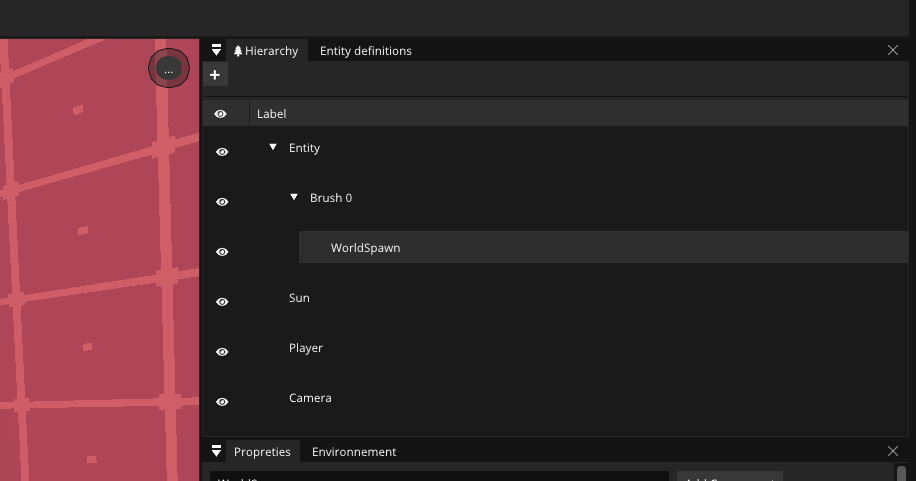 > Entity parenting in Nuake engine.